High Level System Architecture
High-level overview of the system architecture, services, and workflow.
Overview
The following diagram covers the important phases that our system goes through, each phase is well detailed in the following diagrams.
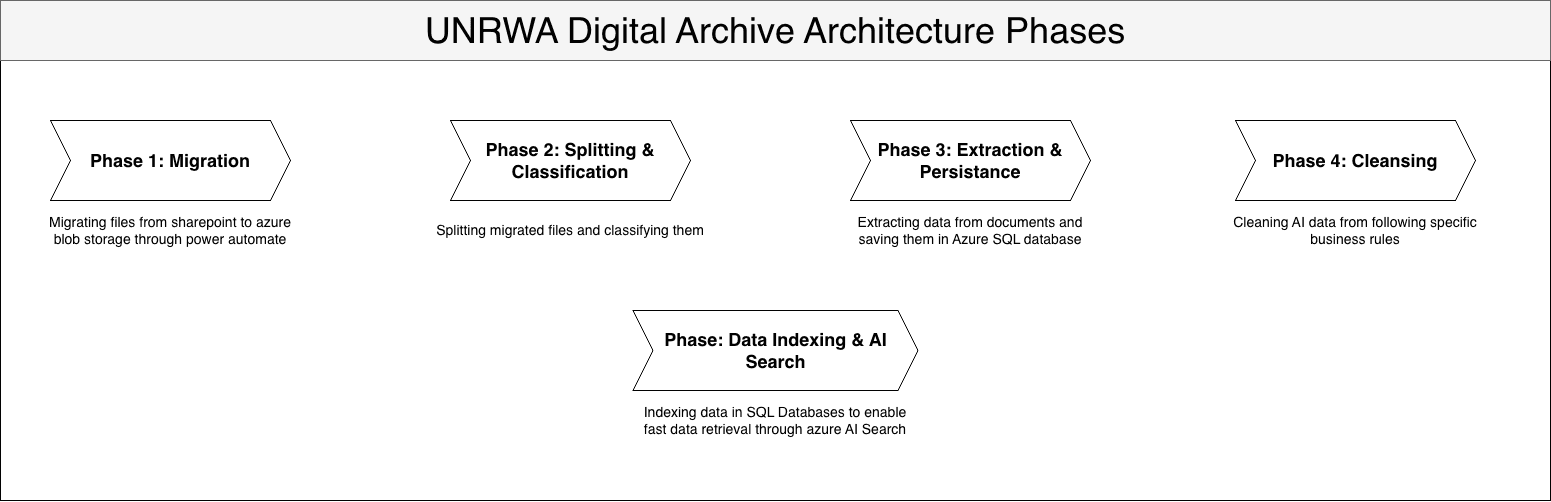
Digital Archive System - Phase Documentation
Phase 1 - Document Upload & Ingestion
Trigger: Manually triggered through Power Automate.
Input: Documents from SharePoint folder (configured location)
Description:
Power Automate reads documents from a configured SharePoint folder 1K By 1K in chunks. Documents are uploaded to Azure Blob Storage in the unprocessed-raw-files container. Once uploaded successfully, the system updates the document status in SharePoint to "Processed" and queues a new event in the document-split-classification-queue to trigger Phase 2 (File Splitter & Classifier).
Diagram:
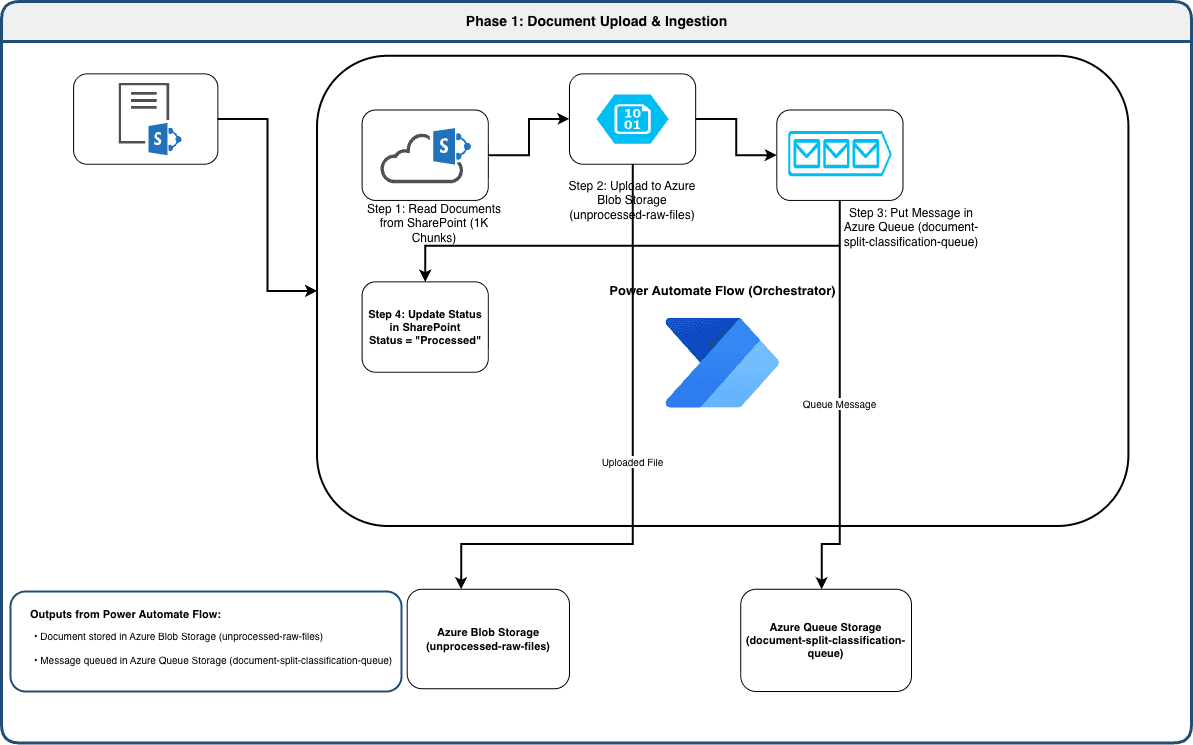
Output:
- Documents stored in Azure Blob Storage (
unprocessed-raw-filescontainer) - Queue message sent to
document-split-classification-queuewith file metadata - SharePoint status updated to "Processed"
Useful Links:
-
Power Automate Workflow
- URL: To be obtained from Mustafa
-
Azure Blob Storage
- Service Name: Azure Blob Storage
- Resource Group: RG-IMTD-DEV-001-DAP
- Storage Account: unrwadastoragedev
- Container: unprocessed-raw-files
- View in Azure Portal
-
Azure Queue Storage - Document Split Classification Queue
- Service Name: Azure Queue Storage
- Resource Group: RG-IMTD-DEV-001-DAP
- Storage Account: unrwadastoragedev
- Queue Name: document-split-classification-queue
- View in Azure Portal
Phase 2 - File Splitter & Classifier
Trigger: Queue message from document-split-classification-queue containing file URL and metadata.
Input: TODO: Check functions original CODE
Azure Function: FileSplitterAndClassifierFunction (.NET)
Description:
This Azure Function is triggered by messages in the document-split-classification-queue. It reads PDF documents from the unprocessed-raw-files blob container and splits them into individual parts (currently only PDF format is supported; TIF support planned for future releases). Split documents are re-uploaded to the processing-stage-splits blob container, and metadata is saved to the database.
The function then classifies each split document using Azure Document Intelligence, routing them to appropriate blob containers based on classification:
- Red Cross Card: Stored in
redcrosscardcontainer - Red Master Card: Stored in
redmastercardcontainer - Unclassified: Stored in
unknown-documentscontainer
On successful completion, a message is queued to document-extraction-queue to trigger Phase 3. If any error occurs, the function retries up to 3 times. After 3 failed attempts, the message is sent to the poison queue document-split-classification-queue-poison for manual investigation.
Diagram:
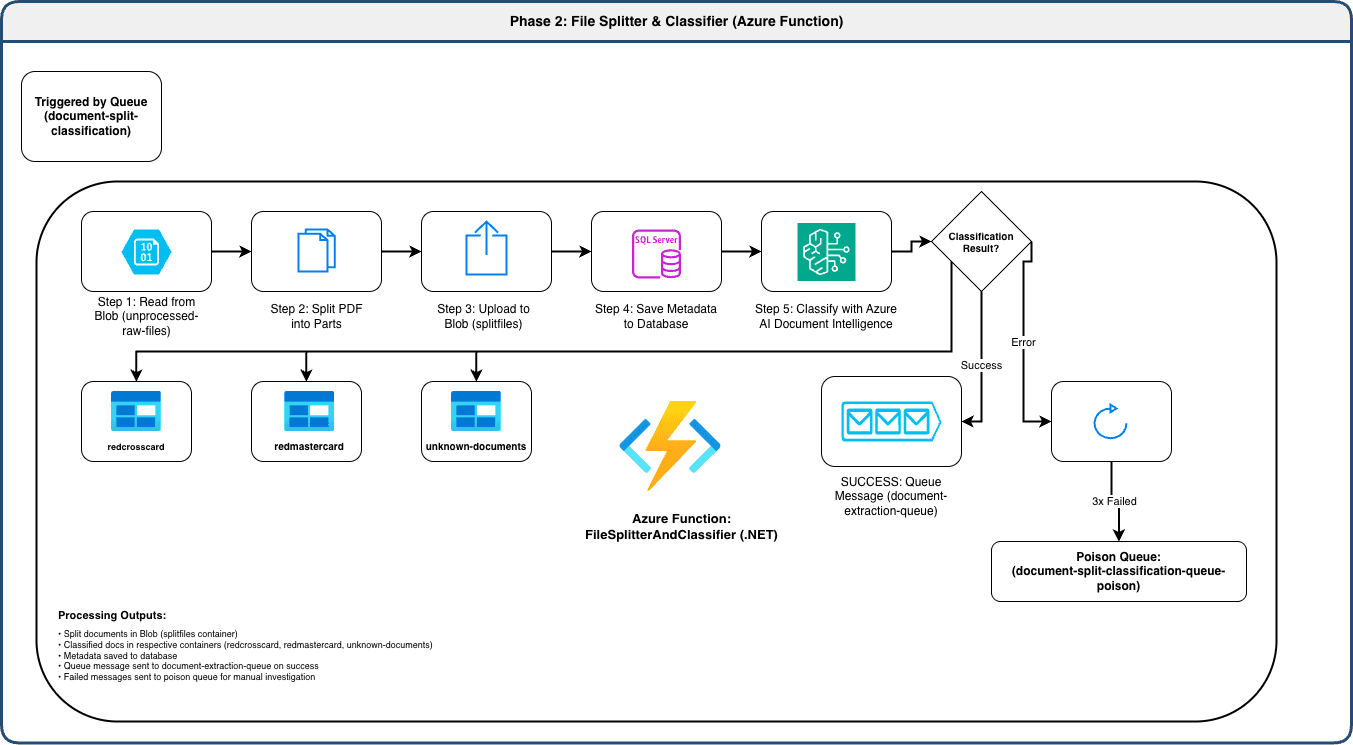
Output:
- Split documents in Blob Storage (
processing-stage-splitscontainer) - Classified documents in respective containers
- Metadata saved to database
- Queue message to
document-extraction-queueon success - Poison queue message on failure after 3 retries
Error Handling:
- Automatic retry: 3 attempts
- Failed messages: Sent to
document-split-classification-queue-poison - Error details captured for manual review
Useful Links:
-
Azure Function - FileSplitterAndClassifierFunction
- Service Name: Azure Functions
- Resource Group: RG-IMTD-DEV-001-DAP
- Function App: dafunctiondev
- Function Name: FileSplitterAndClassifierFunction
- View in Azure Portal
-
Azure Document Intelligence (Form Recognizer)
- Service Name: Azure Cognitive Services
- Resource Group: RG-IMTD-DEV-001-DAP
- Resource: aifoundrydev-resource
- Project: aifoundrydev
- View in Azure Portal
-
Azure Blob Storage - Red Master Card Container
- Service Name: Azure Blob Storage
- Resource Group: RG-IMTD-DEV-001-DAP
- Storage Account: unrwadastoragedev
- Container: redmastercard
- View in Azure Portal
-
Azure Blob Storage - Red Cross Card Container
- Service Name: Azure Blob Storage
- Resource Group: RG-IMTD-DEV-001-DAP
- Storage Account: unrwadastoragedev
- Container: redcrosscard
- View in Azure Portal
-
Azure Blob Storage - Unknown Documents Container
- Service Name: Azure Blob Storage
- Resource Group: RG-IMTD-DEV-001-DAP
- Storage Account: unrwadastoragedev
- Container: unknown-documents
- View in Azure Portal
-
Azure Queue Storage - Document Extraction Queue
- Service Name: Azure Queue Storage
- Resource Group: RG-IMTD-DEV-001-DAP
- Storage Account: unrwadastoragedev
- Queue Name: document-extraction-queue
- View in Azure Portal
Phase 3 - Card Data Extraction
Trigger: Queue message from document-extraction-queue containing file reference and classification result.
Input: TODO: Check functions original CODE
Azure Function: CardExtractionFunction (.NET)
Description:
This Azure Function processes messages from the document-extraction-queue. It first determines the card type from the message payload, then routes the document to the appropriate AI agent:
- Red Cross Cards → Red Cross Card Extraction Agent
- Red Master Cards → Red Master Card Extraction Agent
Each AI agent uses Azure Document Intelligence to extract relevant fields from the document in a category specific manner. Extracted data is then persisted to the database in the following tables:
RedCrossCardEntity(for Red Cross cards)RedCrossCardFamilyMember(family members on Red Cross cards)RedMasterCardEntity(for Red Master cards)RedMasterCardFamilyMember(family members on Red Master cards)RedMasterCardBackEntity(additional data from card back)
On successful extraction, a message is queued to document-data-cleansing-queue to trigger Phase 4. If extraction fails, the function retries up to 3 times before sending the message to the poison queue.
Diagram:
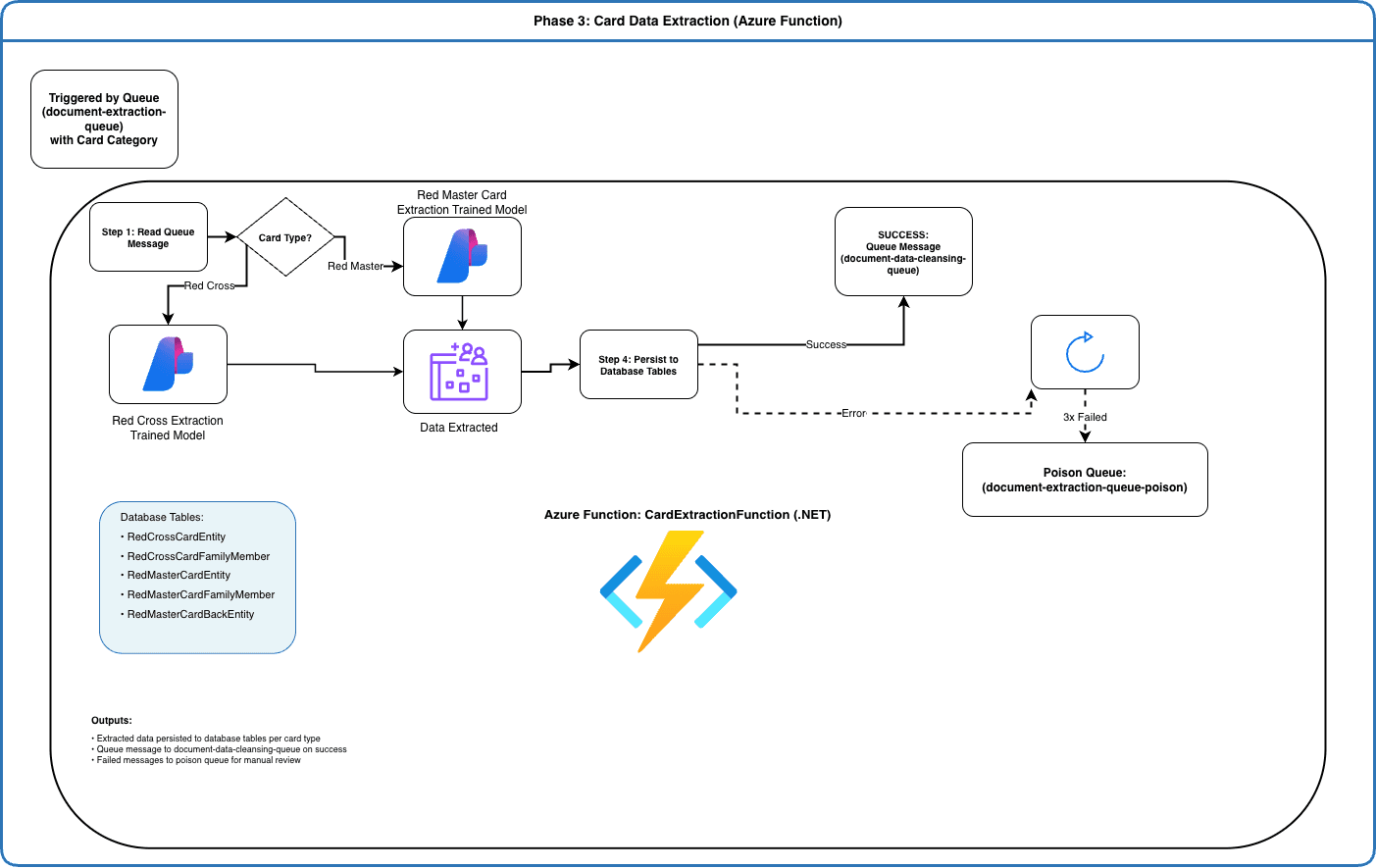
Output:
- Extracted data persisted to database tables (per card type)
- Queue message to
document-data-cleansing-queueon success - Poison queue message on failure
Database Tables Updated:
RedCrossCardEntityRedCrossCardFamilyMemberRedMasterCardEntityRedMasterCardFamilyMemberRedMasterCardBackEntity
Error Handling:
- Automatic retry: 3 attempts
- Failed messages: Sent to
document-extraction-queue-poison - Error details captured for investigation
Useful Links:
-
Azure AI Foundry
- Service Name: Azure Cognitive Services
- Resource Group: RG-IMTD-DEV-001-DAP
- Resource: aifoundrydev-resource
- Project: aifoundrydev
- View in Azure Portal
-
Azure Function - CardExtractionFunction
- Service Name: Azure Functions
- Resource Group: RG-IMTD-DEV-001-DAP
- Function App: dafunctiondev
- Function Name: CardExtractionFunction
- View in Azure Portal
-
Azure SQL Database
- Service Name: Azure SQL Database
- Resource Group: RG-IMTD-DEV-001-DAP
- URL: To be obtained from Mustafa
-
Azure Queue Storage - Document Data Cleansing Queue
- Service Name: Azure Queue Storage
- Resource Group: RG-IMTD-DEV-001-DAP
- Storage Account: unrwadastoragedev
- Queue Name: document-data-cleansing-queue
- View in Azure Portal
Phase 4 - Data Cleansing
Trigger: Queue message from document-data-cleansing-queue containing extracted data reference.
Input:
- TODO: ask mustafa for code
Azure Function: DataCleansingFunction (.NET)
Description:
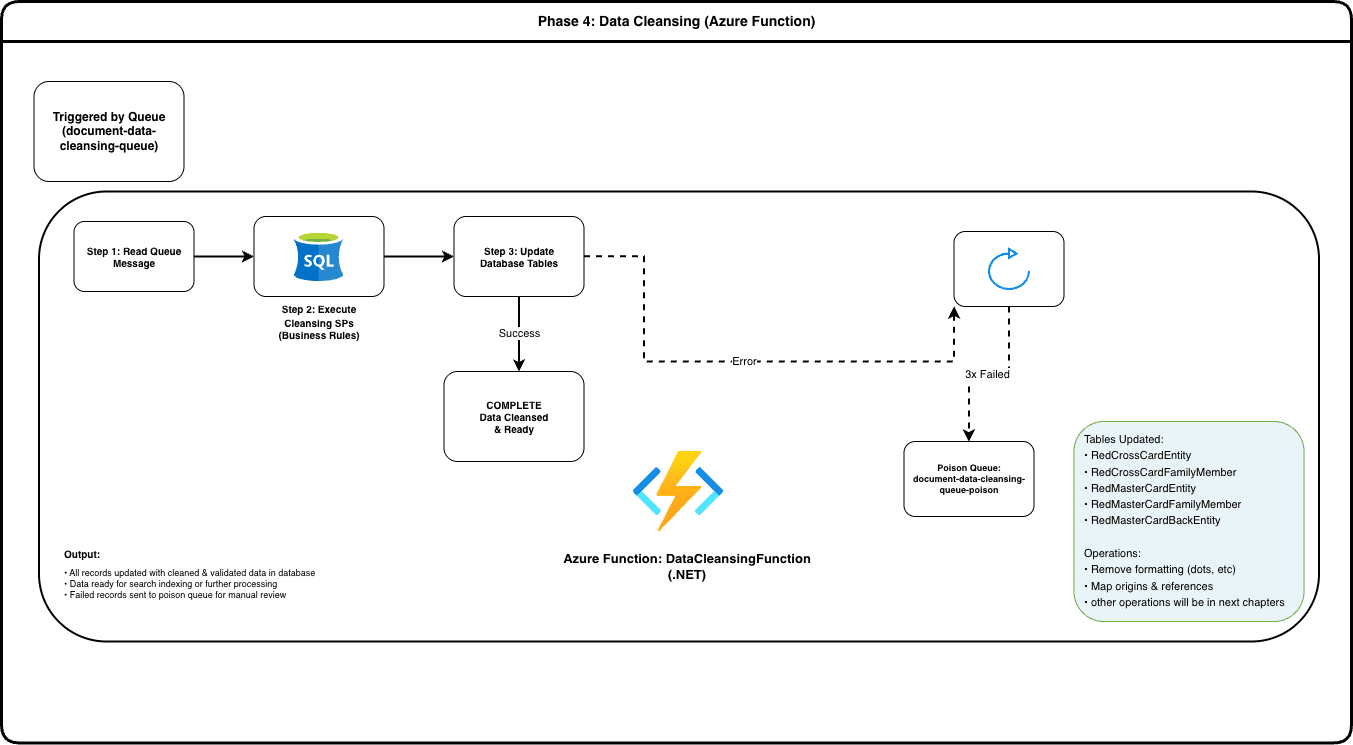
This Azure Function is triggered by messages in the document-data-cleansing-queue. It executes a series of business rule-driven SQL stored procedures to clean, normalize, and validate the extracted data.
Cleansing operations include:
- Removing formatting artifacts (dots, special characters)
- Mapping origin references and family relationships
- Standardizing data formats
- Applying business rules specific to UNRWA refugee processing
All cleansing operations are performed at the database level using stored procedures, updating records in:
RedCrossCardEntityandRedCrossCardFamilyMemberRedMasterCardEntity,RedMasterCardFamilyMember, andRedMasterCardBackEntity
Once cleansing completes successfully, now the data is ready for human review, correction and AI Search indexing. If any error occurs, the function retries up to 3 times before sending the message to the poison queue.
Diagram:
Output:
- All database records updated with cleaned and validated data
- Data ready for review and correction
- Data ready for search indexing
- Poison queue message on failure
Stored Procedures Executed:
- Data format standardization
- Reference mapping
- Business rule validation
Error Handling:
- Automatic retry: 3 attempts
- Failed messages: Sent to
document-data-cleansing-queue-poison - Error details captured for investigation
Useful Links:
-
Azure Function - DataCleansingFunction
- Service Name: Azure Functions
- Resource Group: RG-IMTD-DEV-001-DAP
- Function App: dafunctiondev
- Function Name: DataCleansingFunction
- View in Azure Portal
-
Data Cleansing Rules Document
Phase 5 - AI Search Indexing
Trigger: Manual trigger for indexing on cleaned data in Azure SQL Database.
Input: Data source
Search Service: Azure Search Service (da-ai-search-dev - Foundry IQ)
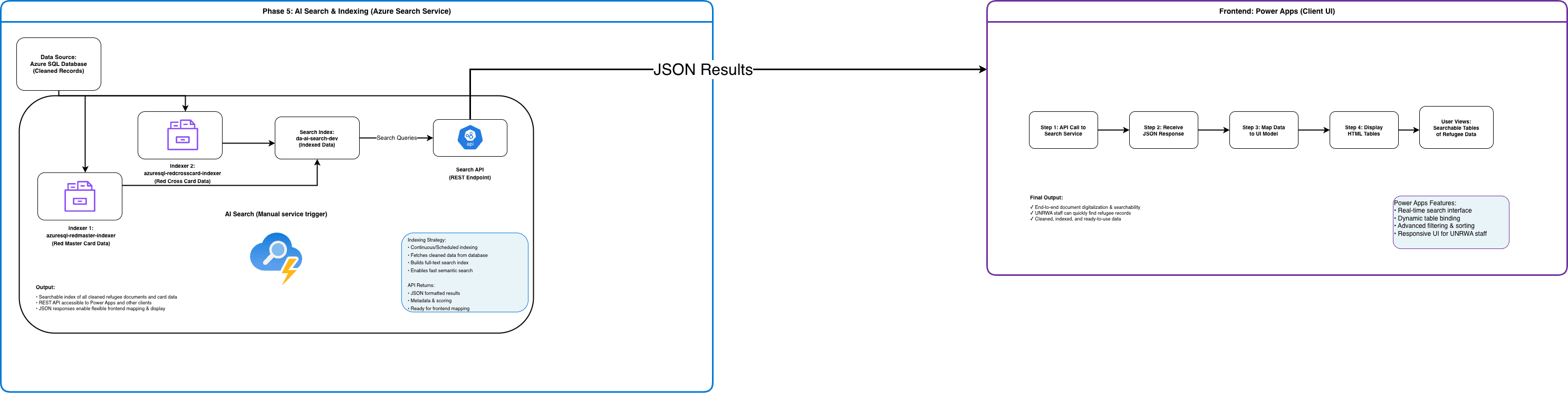
Description: The Azure Search Service indexes cleaned refugee document data using two dedicated indexers:
Indexers:
azuresql-redmaster-indexer- Indexes all Red Master Card data and family membersazuresql-redcrosscard-indexer- Indexes all Red Cross Card data and family members
These indexers automatically pull data from the Azure SQL database at a manual trigger and build a full-text searchable index. The indexed data includes all extracted and cleaned fields, enabling fast semantic and full-text search capabilities.
The search service exposes a REST API that clients (Power Apps, external systems) can use to query the indexed data. API responses are returned in JSON format, making them easy to map to frontend UI components.
Diagram:
Output:
- Searchable index of all cleaned refugee documents
- REST API endpoint for search queries
- JSON formatted results for frontend consumption
Search Capabilities:
- Full-text search across all indexed fields
- Semantic search for intelligent querying
- Advanced filtering and scoring
API Endpoint: https://da-ai-search-dev.search.windows.net
Usefull links:
-
Azure Search Service
- Service Name: Azure Search Service
- Resource Group: RG-IMTD-DEV-001-DAP
- Service Name: da-ai-search-dev
- View in Azure Portal
-
Azure Search Indexers
- Service Name: Azure Search Service
- Resource Group: RG-IMTD-DEV-001-DAP
- Search Service: da-ai-search-dev
- Indexers: azuresql-redmaster-indexer, azuresql-redcrosscard-indexer
- View in Azure Portal
Phase 5-1 - Frontend Display (Power Apps)
Trigger: User initiates search in Power Apps interface.
Input: Search query from user
Client Application: Power Apps
Description:
Power Apps provides the user-facing interface for UNRWA staff to search and retrieve digitized refugee documents. When a user performs a search, Power Apps makes an API call to the Azure Search Service (da-ai-search-dev) with the search query.
The search service returns JSON formatted results containing:
- Document metadata
- Extracted card data (Red Cross or Red Master)
- Family member information
Power Apps maps the JSON response to its internal data model and renders the results as interactive HTML tables. Users can:
- View full details of refugee records
- Access extracted document information
User Workflow:
- User enters search query in Power Apps
- Power Apps calls Azure Search API
- Search service returns JSON results
- Power Apps maps data to UI
- User sees results in HTML tables
Output:
- Searchable, user-friendly interface for refugee document retrieval
- Real-time access to digitized and cleaned records
- Support for UNRWA staff workflows
Features:
- Search interface
- Dynamic table binding and display
- Advanced filtering and sorting